
Skip to content

Google's August 2026 Spam Update Is Finished. Now You Can Read Your Data.

The rollout ran August 18 to August 21. A finished update is the only kind you can measure honestly, and here is the five-check read on your own site.

Avi CohenAvi Cohen
··5 min read
A person reviewing performance data on a laptop at a desk
Key takeaways
  • The update ran August 18 to 21, globally. It was the third spam update of 2026.
  • Compare seven days before against seven days after, non-brand queries only. Skip the rollout days.
  • The policies did not change; enforcement did. Thin and templated pages are the exposed ones.
  • Check Manual Actions first. A spam update never shows there; a manual action always does.

Google’s August 2026 spam update started on August 18 and finished on August 21. It applied globally and to every language.

That three-day window is the most useful fact in this post. While an update is rolling out, your traffic data is noise: rankings move, revert, and move again. Once Google confirms the rollout is complete, the numbers finally mean something. It has now been more than a week, which means your data is readable and it is worth twenty minutes of your attention.

Aug 18
rollout began
about 12:30 pm ET
Aug 21
rollout complete
about 4:50 am ET
2d 16h
total duration
June’s took 2d 1h
3rd
spam update of 2026
after March 24 and June 24
Dates from Google's Search Status Dashboard. Times as reported by Search Engine Land and Search Engine Roundtable.

What Google actually said

This was Google’s third confirmed spam update of 2026, after the March 24 and June 24 rounds. Google described it as a normal spam update, with nothing specifically new. No new category of violation was introduced, and the existing Search spam policies did not change. What changed is the automated systems that enforce them, which Google continues to refine.

Google also noted the update applied globally and across all languages, and that the rollout would take a few days. It took three.

Why a finished rollout is the only one worth measuring

During a rollout, rankings genuinely bounce. A page can drop on day one, recover on day two, and settle somewhere else on day three. Any conclusion you draw mid-rollout is a conclusion about a system still in motion, and any change you make in response is a change you will not be able to attribute later.

Now that the window has closed, you have a clean before and a clean after. Compare the seven days before August 18 against the seven days after August 21, and skip the rollout days entirely.
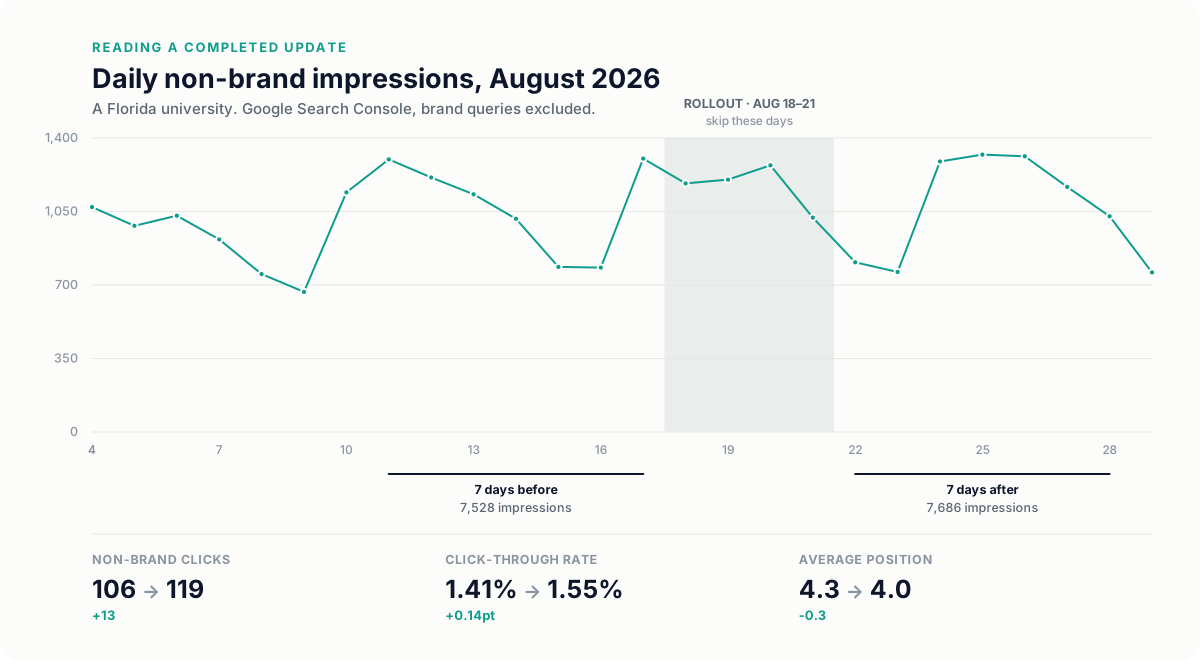
Daily non-brand impressions through August 2026 for a Florida university, with the August 18 to 21 rollout window shaded and the seven-day before and after windows marked. Non-brand clicks moved from 106 to 119, click-through rate from 1.41 to 1.55 percent, and average position from 4.3 to 4.0.
One of our own client properties, read the way this post recommends: non-brand queries only, rollout days excluded, seven days either side. Nothing dramatic happened, which is itself a finding worth writing down.

A completed update is a gift. It is the one moment when a change in your traffic has a single, knowable cause.

The five-check read

  1. Step 1: Compare like for like

    August 11 to 17 against August 22 to 28: same days of the week, non-brand queries only, rollout days excluded. Anything else is comparing two different things.

  2. Step 2: Segment before you conclude

    Split by page type: service pages, blog posts, location pages, anything built from a template. Sitewide averages hide the actual story almost every time.

  3. Step 3: Look at your thinnest pages first

    Spam updates refine enforcement against existing policies, and the pages that sit closest to those lines are usually mass-produced, lightly edited, or built from a template with little unique substance.

  4. Step 4: Separate ranking loss from result-page change

    If your position held but clicks fell, the results page itself changed shape above you. That is a different problem with a different fix.

  5. Step 5: Write down what you see

    Whatever you conclude, record it with dates, using the Search Status Dashboard as the dating source. The next update will land on top of this one, and a written baseline is the only thing that keeps the two apart.

Read your own numbers

Did the update move you?

From Search Console, non-brand queries only. Before: August 11 to 17. After: August 22 to 28.

BeforeAfterChange

Fill in clicks and impressions for both windows to get a read.

What this update was not about

Google said this rollout did not specifically target link spam, which has had its own dedicated updates, and it made no announcement about site reputation abuse, the practice of hosting third-party content on a strong domain to borrow its ranking, which Google enforces separately. If your traffic moved, those are not the first places to look. Community reports after the rollout also pointed to swings in Discover and Google News visibility, so if you rely on either, read those reports separately from web search.

If you were hit

Resist the urge to rewrite half your site this week. Identify the specific pages that lost visibility, read them honestly against Google’s spam policies, and fix the ones that genuinely fall short.

Recovery from a spam update generally arrives with a subsequent update rather than within days of an edit, so the work is worth doing carefully rather than quickly.

And if nothing moved, that is a result too. Write it down and move on.

If the results page above you changed rather than your ranking, that is usually AI Overviews taking the click. We cover that shift in what AI Overviews mean for local businesses, and the underlying selection logic in how AI Overviews choose their sources.


Prompt

Read your before-and-after export

Export the Queries and Pages reports from Search Console for both windows, paste them in, and let the assistant do the segmenting. It will not know your brand terms, so name them.

I am comparing two Google Search Console exports for my site around Google's August 2026 spam update. Window A is August 11 to 17 (before). Window B is August 22 to 28 (after). The rollout days, August 18 to 21, are excluded on purpose.

My brand terms are: [BRAND, MISSPELLINGS, PRODUCT NAMES]. Exclude any query containing them before you compare anything.

Using the pasted data:
1. Report non-brand clicks, impressions, CTR and average position for A and B, and the percentage change.
2. Group pages into: service or product pages, blog posts, location pages, and anything that looks templated (same structure, city or term swapped). Show the change per group.
3. List the ten pages that lost the most clicks and, for each, say whether impressions fell too (visibility loss) or held while clicks fell (the results page changed above it).
4. Tell me plainly whether this looks like a spam-update effect, a results-page change, or noise, and what the single next check should be.

Do not recommend rewriting anything until you have finished step 4.

[PASTE WINDOW A QUERIES]
[PASTE WINDOW B QUERIES]
[PASTE WINDOW A PAGES]
[PASTE WINDOW B PAGES]

Paste into Claude, ChatGPT, Gemini, or any assistant. Check the output against your own data before acting on it.

Frequently asked questions

How long did the August 2026 spam update take to roll out?

It started on August 18, 2026 and completed on August 21, roughly two days and sixteen hours later. Google confirmed it applied globally and to all languages.

Should I make changes to my site while an update is rolling out?

No. Rankings genuinely move and revert during a rollout, so any change you make mid-rollout is one you will not be able to attribute afterwards. Wait for Google to confirm completion, then measure.

What is the difference between a spam update and a core update?

A core update revises how Google assesses relevance and quality broadly. A spam update refines the automated systems that enforce the existing spam policies. The policies themselves do not change in a spam update, which is why the pages most affected are usually ones already sitting close to those lines.

My rankings held but clicks fell. Was that the update?

Often not. If position is stable and clicks dropped, the results page above you likely changed shape, most commonly because an AI Overview now answers the query. That is a different problem with a different fix, and it is worth separating before you touch any pages.

How do I know it was the algorithm and not a manual action?

Open the Manual Actions report in Search Console. A spam update is automated and never appears there; a manual action does, with the reason and the affected pages. If the report is empty, you are reading an algorithmic effect.

How quickly can a site recover from a spam update?

Recovery generally arrives with a subsequent update rather than within days of an edit. That is a reason to fix genuine problems carefully rather than to rewrite large parts of a site quickly.

Avi Cohen
About the author
Avi Cohen · SEO & Digital Analytics

Runs SEO and analytics across Pacific54’s client roster: the audits, the clusters, and the dashboards that keep everyone honest.